ImmigraForms vs ImmigrantPro: Legacy Desktop Forms Software vs Modern Cloud Form Preparation
If your immigration law firm is comparing ImmigrantPro / Immigrant Software with newer cloud-based form-preparation tools, the right choice depends on how your team works today: desktop software and local workflows, or intake-first collaboration with reusable client data.
This guide compares ImmigrantPro and ImmigraForms from a practical law-firm operations perspective: setup, workflow, intake, data reuse, team collaboration, pricing signals, and what each type of tool is best suited for.
Quick summary
ImmigrantPro, also known through Immigrant Software / Immigrant Professional, is a long-standing immigration forms software product with a legacy desktop orientation. Public pages from Immigrant Software describe a product history going back decades, a Windows-based software lineage, and annual pricing for Immigrant Professional.
ImmigraForms is built for immigration law firms that want a modern cloud workflow: collect client information, identify missing details, reuse structured data across forms, and reduce repetitive form-entry work without replacing attorney review.
- Choose ImmigrantPro if your firm prefers an established desktop-style forms tool, already works well in a local Windows environment, and mainly wants affordable forms processing.
- Choose ImmigraForms if your firm wants a cloud-based, intake-first workflow that helps staff organize client information, reuse data, and prepare forms faster across the team.
What is ImmigrantPro?
ImmigrantPro is the flagship immigration forms product from Immigrant Software. According to Immigrant Software's public website, the company has provided electronic forms processing to the immigration community for many years and says its software is used on thousands of desktops around the world.
The company's public pages position the product around immigration forms processing rather than a large all-in-one case-management platform. Its product page asks whether a firm really needs to pay for a full case management solution when forms will do. That makes the product especially relevant for firms that want focused forms software instead of a broader practice-management migration.
Immigrant Software's public pricing page lists Immigrant Professional annual subscription pricing, including a single-user price and multi-user pricing. As with any software purchase, firms should verify current pricing, licensing, supported forms, and platform requirements directly with the vendor before deciding.
What is ImmigraForms?
ImmigraForms is immigration form-preparation software for U.S. immigration law firms. It is designed around a modern workflow: enter client information once, select the forms needed for the case, auto-fill repeated fields, review the work, and export USCIS form packets for the firm's process.
The goal is not to replace legal judgment. ImmigraForms helps legal teams reduce repetitive administrative work, spot missing client information earlier, and keep attorneys and staff in control of the final review.
For law firms that are tired of typing the same biographic details, addresses, A-Numbers, employment history, and family information across multiple forms, the main value is workflow efficiency: structured client data that can support multiple forms without starting from scratch every time.
Key difference: desktop form software vs cloud workflow
The biggest difference is not simply old versus new. It is workflow philosophy.
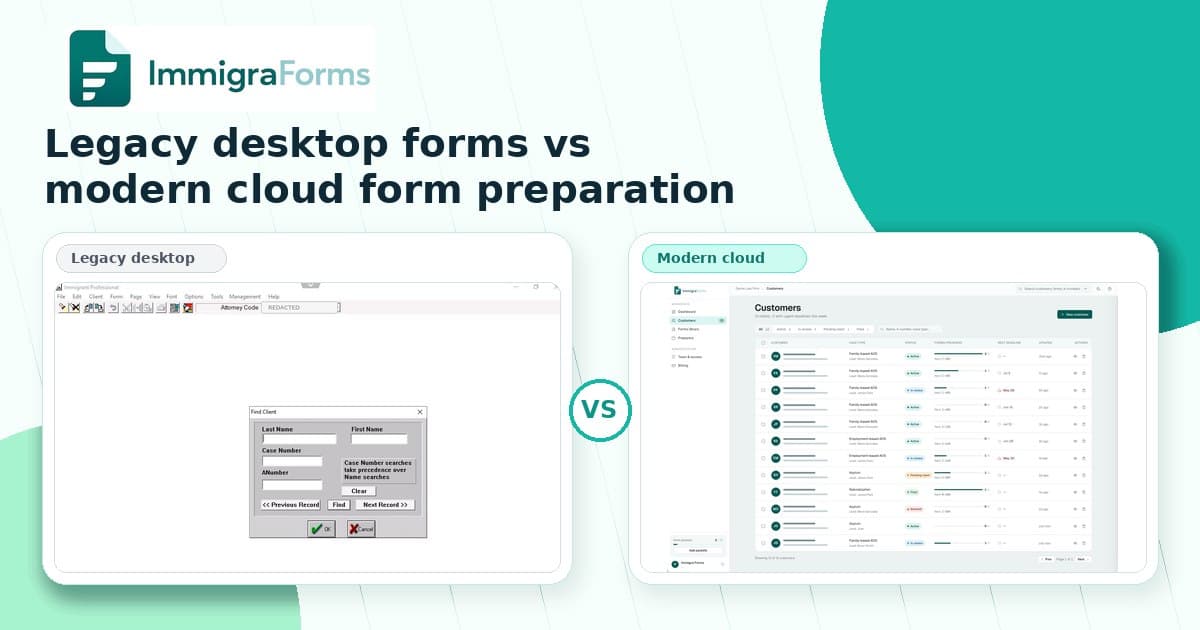
Traditional desktop forms software is often centered around preparing forms on a specific machine or local setup. That can work well for firms with stable office-based processes, clear file-management habits, and staff who are comfortable with that environment.
A cloud-based form-preparation workflow is different. It is centered around shared structured data, intake, collaboration, and reducing repeated entry across the matter. Instead of treating every form as a separate document, the firm can treat the client profile and case facts as the source of truth.
For growing immigration firms, that difference matters because delays often happen before the final form review: incomplete intake, repeated data entry, missing biographic details, and staff time spent copying the same information from one place to another.
Comparison by workflow area
1. Setup and access
Immigrant Software's public history references Windows-based immigration software, and legacy desktop tools typically fit best when firms are comfortable installing and managing software locally.
ImmigraForms is built as a web-based SaaS workflow. That makes it easier for teams that want to access client and form-preparation work through a browser, support distributed staff, and avoid managing desktop software across multiple machines.
2. Client intake and missing information
One of the biggest operational problems in immigration law is not only filling out forms. It is knowing what information is missing before staff spend time drafting.
ImmigraForms is designed around intake and structured client data. The aim is to help the team see gaps earlier, complete missing client details, and avoid discovering missing information after work has already started on multiple forms.
If a firm already has a strong intake process and only needs a low-cost forms processor, ImmigrantPro may be enough. If intake completeness and data reuse are central bottlenecks, a cloud workflow like ImmigraForms may be a better fit.
3. Repetitive data entry
Immigration packets often repeat the same facts across multiple forms. A client's name, date of birth, address history, family information, immigration history, and identifiers can appear again and again.
ImmigraForms focuses heavily on reducing that repetitive entry. The firm enters information into structured client and case records, then reuses those facts across the forms selected for the matter.
This is especially useful for firms that prepare multi-form packets and want staff to spend less time copying the same data and more time reviewing exceptions, missing fields, and case-specific details.
4. Team collaboration
Desktop-oriented workflows can be efficient for a single user or tightly controlled office setup. But as more staff touch a case — intake coordinators, paralegals, attorneys, and operations staff — collaboration becomes harder if information is scattered across PDFs, local files, email threads, and spreadsheets.
ImmigraForms is intended for team workflows where client information, missing data, and form preparation can be organized in one web-based process. That can be especially helpful for small and mid-sized firms that want more standardization without moving their entire practice to a large case-management suite.
5. Pricing and buying motion
Immigrant Software publicly lists annual pricing for Immigrant Professional, including single-user and multi-user options. That pricing can be attractive for firms that want a low-cost forms tool and are comfortable with the product model.
ImmigraForms is positioned as a modern SaaS option for firms that value cloud access, intake workflows, structured data, and faster preparation. Firms should compare not only subscription price, but also staff time, onboarding friction, repeated data entry, and how often incomplete intake delays form preparation.
When ImmigrantPro may be the better fit
ImmigrantPro may be a practical option if your firm:
- Wants a long-standing immigration forms product with a desktop-oriented workflow.
- Primarily needs forms processing, not a broader intake and collaboration system.
- Is comfortable with local software installation and existing office workflows.
- Prioritizes a low annual software cost over cloud collaboration features.
- Already has a separate process for intake, missing information, document collection, and case tracking.
When ImmigraForms may be the better fit
ImmigraForms may be a better fit if your firm:
- Wants a modern browser-based workflow instead of desktop-first form preparation.
- Needs to reduce repetitive data entry across immigration forms.
- Wants to identify missing client information earlier in the process.
- Has paralegals, assistants, or remote staff collaborating on form preparation.
- Wants client and case information organized as reusable structured data.
- Does not want to migrate immediately into a large all-in-one case-management platform.
The real question: what is slowing your firm down?
For many immigration firms, the bottleneck is not only whether the correct form exists in the software. The bottleneck is the workflow around the form:
- How does the client provide information?
- How does the team know what is missing?
- How often does staff retype the same facts?
- How many people touch the data before attorney review?
- How easy is it to reuse information across forms and future matters?
If your main pain is simply accessing and completing immigration forms from a familiar desktop environment, ImmigrantPro may be worth evaluating. If your main pain is intake quality, repeated entry, scattered client facts, and team workflow, ImmigraForms was built for that problem.
SEO comparison checklist for law firms
Before choosing immigration forms software, ask these questions:
- Platform: Is the product desktop-first or cloud-based?
- Intake: Does it help collect and organize client information before forms are prepared?
- Missing data: Can staff see incomplete information early?
- Data reuse: Can client facts flow across multiple forms without retyping?
- Team workflow: Can multiple staff members work from the same structured information?
- Attorney control: Does the workflow preserve legal review and final firm judgment?
- Adoption: How quickly can your team try the product on one real packet?
Bottom line
ImmigrantPro is a long-standing desktop-oriented immigration forms tool with public pricing that may appeal to firms looking for affordable forms software. ImmigraForms is built for firms that want a modern cloud workflow focused on intake, missing information, reusable client data, and less repetitive form-entry work.
The best choice depends on your firm's bottleneck. If your team is already efficient with desktop forms software, a legacy tool may continue to work. If your team is losing time to repeated data entry, incomplete intake, scattered client information, and manual form preparation, ImmigraForms is worth testing on one packet.
Start a free ImmigraForms trial or compare modern immigration form-preparation workflows.
FAQ
Is ImmigraForms a replacement for an immigration attorney?
No. ImmigraForms is software for law firms. It helps organize client information and prepare form workflows, but legal review, strategy, and filing decisions remain with the legal team.
Is ImmigrantPro the same as Immigrant Software?
ImmigrantPro / Immigrant Professional is associated with Immigrant Software, whose public website describes immigration forms software and related pricing. Firms should verify current product names, pricing, and features directly with Immigrant Software.
Why compare desktop software with cloud software?
Many immigration firms are deciding whether to keep using familiar desktop tools or move toward cloud workflows that support intake, team collaboration, and reusable client data. The comparison helps firms understand the operational tradeoffs.
Can ImmigraForms help with missing client information?
Yes. ImmigraForms is designed to help law firms organize client data and identify missing details earlier so staff can complete the information before and during form preparation.
What should a small immigration law firm test first?
Start with one common packet or workflow where your staff repeatedly enters the same client information. Measure how much time is spent collecting data, finding missing details, entering information, reviewing forms, and exporting the final documents.